Yeah, I was gonna say, this is pretty much my life, but it was way cheaper and it’s much easier to get into and out of. Plus I can bring it with me when I go make a sandwich… or poop. I don’t use quite as many “monitors”, only have 2, but they are both 4k, so I have more pixels than all those combined anyway. If I put them both into quad 1080p pane mode, I basically have that. Just stretch the top content across two of the panes for the widescreen.
Also, I get in my exercise still. Not that I can say for certain this guy doesn’t, but it sure ‘feels’ that way when you think of the process of getting into and out of that. Maybe that -is- his exercise.
Currently in bed, typing this on my PC via Virtual Desktop. Never really got into multi-monitor setups, but having my PC’s monitor floating above me when I don’t feel like sitting is nice.
Right now the choice is between Quest 3 or waiting for Steam Frame, which is shaping up to be a sidegrade based on what’s known about the specs.
Pros of Q3 are the colour passthrough, much lower price and access to the few exclusive games, which are all really good, especially Arkham Shadow. Though Meta recently stopped funding first-party games, so there won’t be more of those going forward.
Pros of the Frame are not buying from Meta and better Linux support.
Detailed comparison will have to wait until after the Frame is released, of course.
Yeah, 2 is all I personally ever use, and the second one is mostly there cuz my main one is based on my real TV that is old enough it can only do 60hz at 4k. The Virtual 4k screen can do 120hz. So when I want to share with people in the real world, the 60hz screen is my main screen, and when I am playing for myself only, the 120hz screen is my main screen. The second screen normally just has static information on it, or sometimes a video if what I’m doing on the main screen can handle having a video playing. But I am not ADHD, so second screen content is distracting to me, rather than allowing to not be distracted like it is for them.
Most of the time, only one monitor is actually in my line of sight at any given time. And I just hit the swap positions button when I want to change. But if I have info up during a game, I can glance at the other screen. Or if I’m watching a TV show or something on the second monitor, while playing a non-timed puzzle game or something on the main. I can either look at the other screen for interesting parts of the show, or hit the swap button.


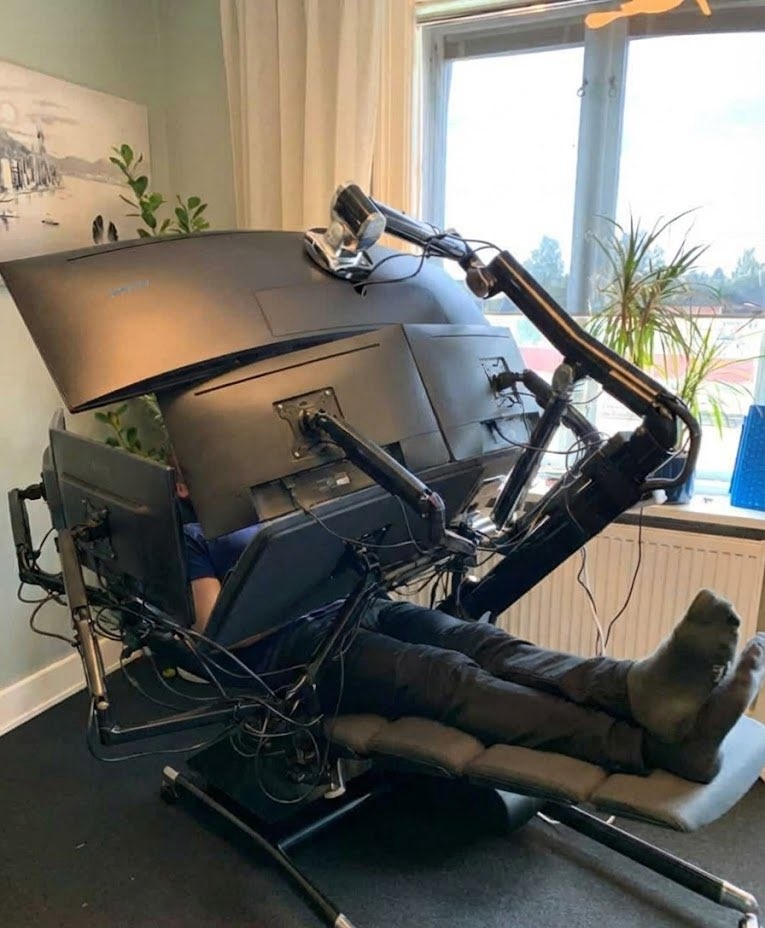
Yeah, I was gonna say, this is pretty much my life, but it was way cheaper and it’s much easier to get into and out of. Plus I can bring it with me when I go make a sandwich… or poop. I don’t use quite as many “monitors”, only have 2, but they are both 4k, so I have more pixels than all those combined anyway. If I put them both into quad 1080p pane mode, I basically have that. Just stretch the top content across two of the panes for the widescreen.
Also, I get in my exercise still. Not that I can say for certain this guy doesn’t, but it sure ‘feels’ that way when you think of the process of getting into and out of that. Maybe that -is- his exercise.
Currently in bed, typing this on my PC via Virtual Desktop. Never really got into multi-monitor setups, but having my PC’s monitor floating above me when I don’t feel like sitting is nice.
As a multi-monitor setup addict waiting for the 5th monitor delivery, this does sound quite compelling. Which goggles would you recommend?
Right now the choice is between Quest 3 or waiting for Steam Frame, which is shaping up to be a sidegrade based on what’s known about the specs.
Pros of Q3 are the colour passthrough, much lower price and access to the few exclusive games, which are all really good, especially Arkham Shadow. Though Meta recently stopped funding first-party games, so there won’t be more of those going forward.
Pros of the Frame are not buying from Meta and better Linux support.
Detailed comparison will have to wait until after the Frame is released, of course.
Yeah, 2 is all I personally ever use, and the second one is mostly there cuz my main one is based on my real TV that is old enough it can only do 60hz at 4k. The Virtual 4k screen can do 120hz. So when I want to share with people in the real world, the 60hz screen is my main screen, and when I am playing for myself only, the 120hz screen is my main screen. The second screen normally just has static information on it, or sometimes a video if what I’m doing on the main screen can handle having a video playing. But I am not ADHD, so second screen content is distracting to me, rather than allowing to not be distracted like it is for them.
Most of the time, only one monitor is actually in my line of sight at any given time. And I just hit the swap positions button when I want to change. But if I have info up during a game, I can glance at the other screen. Or if I’m watching a TV show or something on the second monitor, while playing a non-timed puzzle game or something on the main. I can either look at the other screen for interesting parts of the show, or hit the swap button.