


You can login to (using my preferences as an example) DDG and configure it to not use AI, but I mostly browse in private/incognito mode and don’t care to login to DDG every time I open a browser. However, I - and you - don’t have to login to enforce that preference; at least with DDG you can set a default search engine that automatically avoids it. Here are the parameters in mobile Firefox:

Even in Chrome and Chrome derivatives, you can set a default search engine; I don’t know the exact steps, but the end result should look similar to the above.
If you prefer to stick with Google, even they offer a no AI solution. I haven’t used Google in years, but according to arstechnica, this would be the equivalent configuration:
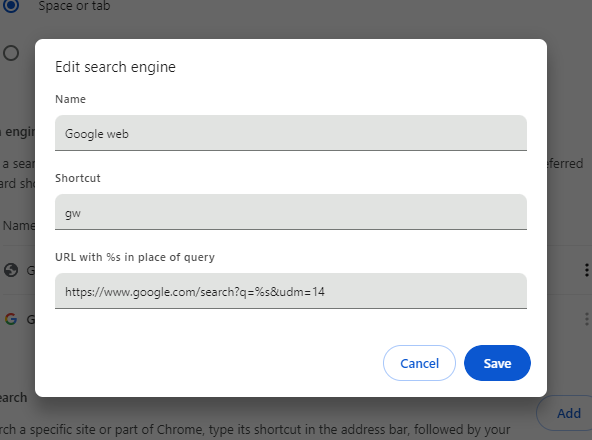
I’ve not used any other search engines since Altavista, so I can’t provide details for each one, but hopefully this is a good starting point.
edit: It seems this changed … Or maybe I had it wrong from the beginning, but I tested this when I posted it, so I think it changed. Regardless, the q= is not necessary currently.
For DDG,
https://noai.duckduckgo.com/?q=%25sBut it seems it changed, so
https://noai.duckduckgo.com/%sedit: as pointed out below, the first one (now corrected) was missing a ?. I am simply a dumbass for missing it. Hopefully that helps anyone coming on this in the future.
The first URL is missing a question mark: https://noai.duckduckgo.com/?q=%25s
Edit: Please ignore the “25”. It should end with “%s”. I can’t actually write that, due to a Lemmy bug. 🫠
Oh, you’re right. I’m just a dumbass. Thank you!
thank you!
No problem.
q=%s worked as recently as last week for me. They might as well automate the extensions and let you just use the domain name as an input to make it easier for the layperson to do.